Leaves and Floral Set: Versatile Vector Assets
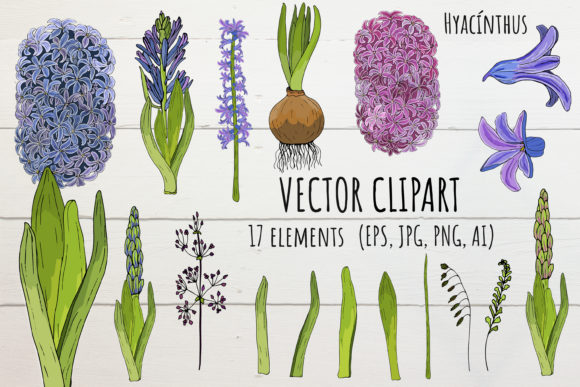
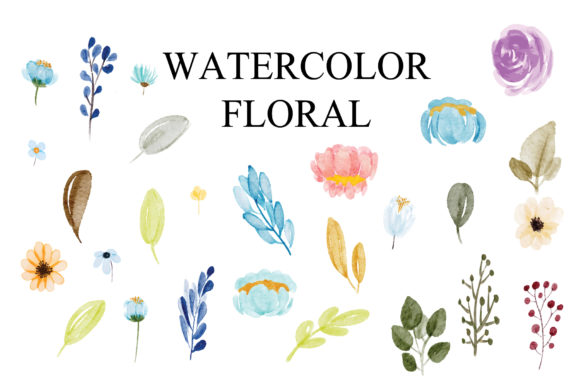
Finding the perfect botanical elements for a design project often feels like searching for a needle in a haystack. You might spend hours sketching individual petals or sifting through low-quality stock images that pixelate when resized. A comprehensive Leaves and Floral Set changes this dynamic entirely by providing ready-to-use, professional-grade vector assets. Specifically, a collection featuring 9 flowers and 11 leaves offers a balanced ecosystem of organic shapes that can transform blank canvases into lush, inviting designs. These assets are not just decorative clip art; they are foundational building blocks for creators who need flexibility, quality, and speed without sacrificing artistic integrity.
Understanding the Technical Advantage of EPS and AI Files
When evaluating digital art resources, the file format dictates your creative freedom. This specific set includes both EPS and AI files, which is the industry standard for professional vector graphics. Unlike raster images such as JPEGs or PNGs that are made of fixed pixels, vector files use mathematical paths. This means you can scale a delicate flower from the size of a postage stamp to the side of a billboard without ever losing sharpness or clarity. The inclusion of Adobe Illustrator (AI) source files allows for deep customization, enabling you to adjust anchor points, change colors, or reshape stems to fit your unique composition.
The EPS (Encapsulated PostScript) format ensures broader compatibility. While AI files are native to Adobe Illustrator, EPS files can be opened and edited in various other vector programs like CorelDRAW, Inkscape, or Affinity Designer. This versatility makes the Leaves and Floral Set accessible to a wider range of users, from agency professionals using the full Adobe Creative Cloud to freelancers and hobbyists working with alternative software. Having both formats in one package future-proofs your asset library and ensures you are never locked out of your own design resources due to software updates or platform changes.
Why 300 DPI Matters for Print and Digital Clarity
Resolution is often misunderstood in the context of vector art, but it remains a critical specification for mixed-media workflows. While vectors themselves are resolution-independent, this set is noted as 300 DPI (dots per inch). This specification is vital for two main reasons. First, if the set includes any raster textures or effects embedded within the vector paths, 300 DPI ensures those elements remain crisp during high-quality printing. Second, many designers eventually need to export their vector compositions as high-resolution PNGs or TIFFs for clients or web use. Starting with assets optimized at 300 DPI guarantees that your final exports meet professional print standards for brochures, packaging, and stationery, eliminating the risk of blurry edges or jagged lines in physical products.
Practical Applications Across Creative Disciplines
The true value of a curated botanical set lies in its adaptability. With 9 distinct flowers and 11 complementary leaves, you have enough variety to create complex arrangements without the visual repetition that often plagues smaller packs. This balance supports numerous creative and commercial applications.
- Brand Identity and Packaging: Small business owners and marketers can use these organic elements to soften corporate branding or add an artisanal touch to product labels. The natural flow of leaves helps guide the viewer’s eye around logos and text, creating a cohesive visual narrative for skincare, tea, or sustainable fashion brands.
- Wedding and Event Stationery: For designers specializing in invitations, save-the-dates, and menus, this set provides elegant motifs that can be mixed and matched. The ability to recolor vectors means a single floral set can serve multiple clients simply by adjusting the palette to match wedding themes, from rustic sage greens to vibrant summer corals.
- Digital Content Creation: Bloggers and social media managers can utilize these florals as overlays for quotes, headers for blog posts, or decorative borders for YouTube thumbnails. Because they are vectors, they load quickly and look sharp on retina displays, enhancing the perceived quality of digital content.
- Educational Materials: Teachers and educators creating worksheets, certificates, or classroom decor can use friendly floral illustrations to make learning materials more engaging. The clean lines of vector art reproduce perfectly on standard office printers, making it easy to create beautiful handouts without expensive design services.
Customization Tips for Beginners and Professionals
Owning the Leaves and Floral Set is only the first step; mastering its application requires understanding how to manipulate vector elements effectively. Beginners should start by exploring the layer structure within the AI or EPS file. Often, individual flowers and leaves are grouped separately, allowing you to isolate specific elements. Do not feel obligated to use every element in a single design. Sometimes, a single leaf used as a subtle background texture is more powerful than a dense bouquet.
For intermediate and advanced users, consider breaking apart the groups to rearrange individual petals or leaves. Vectors are modular; you can duplicate a petal to create a fuller bloom or stretch a stem to create a custom vine. Experiment with blending modes and transparency to create depth. Placing a semi-transparent leaf behind text can improve readability while adding visual interest. Additionally, because these are vector files, you can apply gradient fills or custom brushes to the strokes, giving flat illustrations a hand-painted or watercolor aesthetic that feels unique to your project.
Key Considerations Before Licensing and Using
Before integrating this botanical collection into your workflow, it is essential to review the licensing terms associated with the download. Not all floral sets permit commercial use, and some may require attribution or prohibit resale of the assets as standalone files. Understanding these boundaries protects your business and respects the original artist's work. If you plan to use these designs for client projects or products intended for sale, verify that the license covers "commercial use" or "extended commercial use" as needed.
Technical preparation is equally important. Ensure your software version supports the specific EPS or AI version provided. While most modern software is backward compatible, older versions of Illustrator may struggle with newer AI files. It is also wise to organize your assets immediately upon download. Create a dedicated folder structure for your vector libraries so you can locate the Leaves and Floral Set quickly during tight deadlines. Tagging files with keywords like "botanical," "vector," "floral," and "nature" in your operating system or asset management tool will save valuable time in future projects.
Finally, consider the stylistic alignment with your brand or project goals. Botanical illustrations range from hyper-realistic to abstract and geometric. Analyze the line weight, shading style, and overall mood of this specific set before purchasing. Does it convey the elegance required for a luxury spa brochure, or the playfulness needed for a children’s book? Matching the artistic tone of the vector set to your project’s emotional objective ensures the final result feels intentional and polished rather than generic. When selected thoughtfully, a high-quality floral set becomes more than just a file; it becomes a reliable creative partner that elevates your design capabilities across print, digital, and merchandise platforms.